

Cost Estimating Templates: Streamline Your Project Budgets
TL;DR: A cost estimating template makes it easy to estimate project costs quickly and accurately. This guide covers why estimation templates are critical for every project, what features a good estimation template must include, project cost estimation techniques, and how to use and customize your estimate template for projects in construction, IT, or any industry.
Introduction: Why You Need a Cost Estimating Template to Estimate Project Costs
Project costs can spiral out of control if you don’t have a clear, well-structured estimate template. It’s a common problem. Budgets scattered across spreadsheets, confusion over estimated costs, and last-minute cost overruns that throw off the entire project.
A cost estimating template provides the structure you need to estimate project costs with confidence. Teams can double check their numbers, ensure every task and resource is captured, and use standardized processes to deliver more accurate project estimates. Good templates help identify the most important aspects of project budgets, eliminate errors, and make it easier to track actual costs as the project moves forward.
And with digital solutions like CostOS, estimate templates are integrated with automation for totals, markups, and even ERP connections. The more accurate your estimates, the better your chances of a successful project. Let's break down why a solid estimation template is the foundation of better project cost estimation and management.
What is a Cost Estimating Template?
A cost estimating template is a structured document often in Excel, Google Sheets, or specialized software designed to help you estimate project costs for any type of project, from simple jobs to large construction projects. The template works by splitting costs into line items and categories, automatically calculating totals and subtotals, and tracking each resource needed.
Modern templates use built-in formulas and leverage historical data to make your estimates more accurate. Many cost estimating templates offer space for direct and indirect costs, contingency funds, and terms and conditions. With a free estimate template or a customizable solution, you can break your entire project down into individual tasks and build a defensible project cost estimate even for highly detailed jobs.
Software like Venngage and CostOS make it easy to use estimation templates that are ready for any project scope. Just pick a template, enter your figures, and let the system automatically calculate everything for you.
Who Uses Cost Estimating Templates and Why?
Cost estimating templates are used across industries by project managers, engineers, general contractors, consultants, and business owners. Whether for a construction project, IT implementation, or client services, using an estimate template enables contractors and teams to:
- Estimate project costs for better project planning and budgeting
- Break down costs by task, labor, materials, and indirect expenses
- Double check calculations and track estimated versus actual costs
- Streamline the bidding process with standardized documents
- Present clear project cost estimates to stakeholders and clients
Good estimation templates mean no more guesswork. Project managers, construction companies, and project owners can identify every resource needed, prevent cost overruns, and create more bids with less administrative hassle.
Project Cost Estimation Techniques: How to Estimate Project Costs
Choosing the right technique to estimate project costs is vital. Every estimate template should support these common methods:
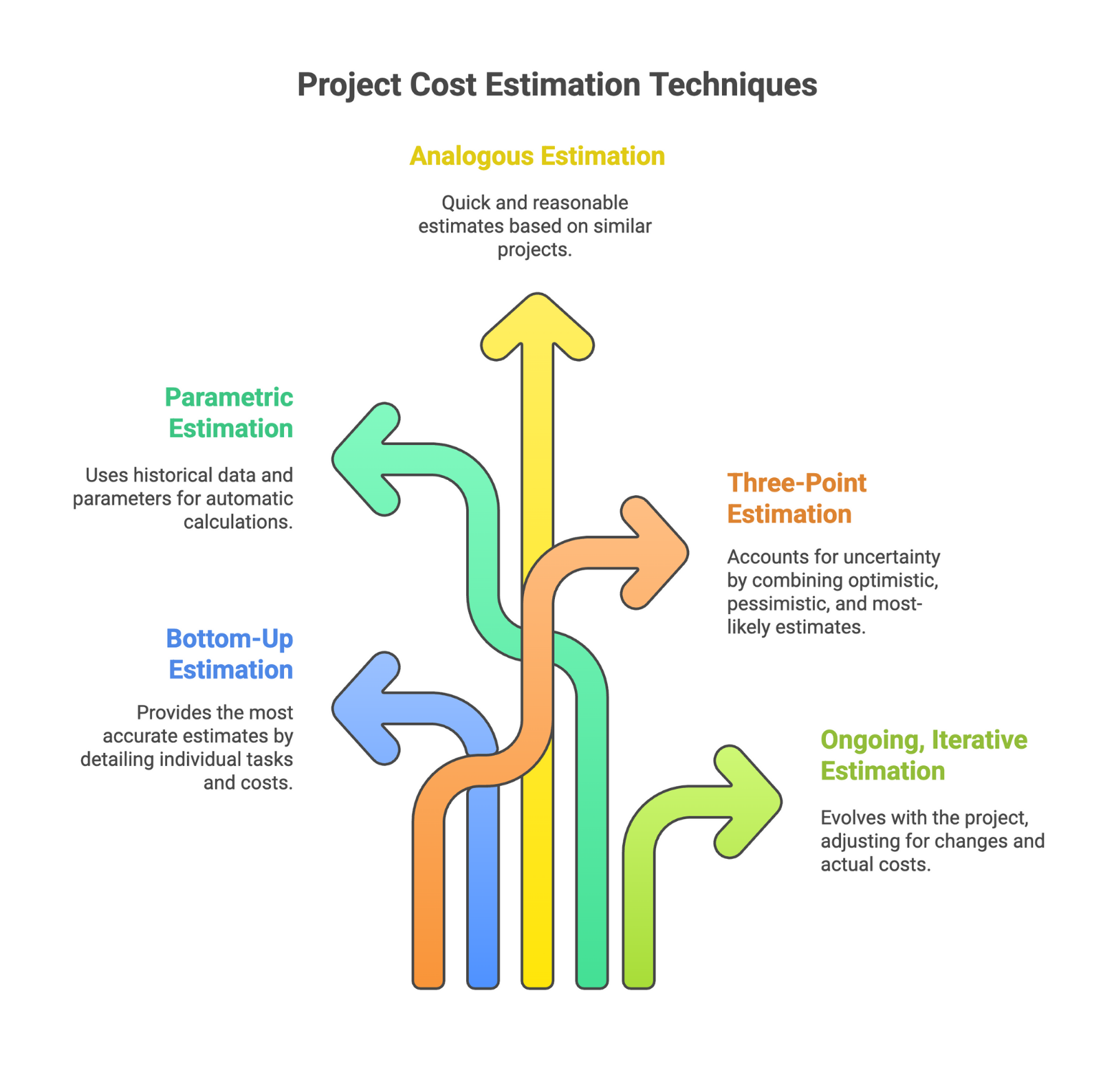
Bottom-Up Estimation
Bottom-up estimation starts by breaking your project into specific individual tasks. Each item is estimated for labor, material costs, resources, and time, then totaled for a comprehensive project cost estimate. This process leads to the most accurate estimates, especially when you have detailed project scopes.
Parametric Estimation
Parametric estimation uses historical data and measurable parameters, like cost per unit or labor hours per task, across similar projects to automatically calculate projections for your new project. Tools with built-in parametric models and cost databases are ideal for this approach.
Analogous Estimation
Analogous estimation is based on results from similar projects. By looking at what comparable projects cost and adjusting for the differences, you can quickly produce a reasonable estimate. This technique is faster but usually less precise than bottom-up methods.
Three-Point Estimation
Three-point estimation calculates a project’s expected cost by combining three figures: optimistic, pessimistic, and most-likely estimates. This approach helps account for uncertainty within the estimation process.
Ongoing, Iterative Estimation
Project cost estimation is an iterative process that evolves during project phases. Project managers must continually track, revise, and double check estimated costs, adjusting for scope changes, new resources, and actual costs as the project progresses.
Remember: Accurate project cost estimates depend on breaking down every task, identifying all resources needed, and using historical data whenever possible for validation. The better your template guides you through these important steps, the more accurate your estimates will be.
Why Accurate Cost Estimation and Templates Matter for Every Project
Accurate project cost estimation is critical. Here’s why estimation templates are the backbone for every successful project:
- Templates help managers and contractors create project cost estimates that reflect the true anticipated cost right from the start, reducing surprises.
- Estimating project costs enables project managers to allocate resources needed to complete tasks, set a realistic project timeline, and ensure sufficient budget.
- A cost estimating template helps forecast total cost, manage profit margins, and avoid cost overruns.
- Templates document your assumptions, show how resources and materials are divided, and clarify the entire project scope for stakeholders.
- When every project cost estimate is prepared using a standardized estimation template, reviews, approvals, and comparisons all get easier. People are on the same page.
- Detailed breakdowns in an estimate template justify project costs, strengthen client relationships, and help secure immediate sign-off.
- Templates allow you to compare project estimates to actual costs for continual improvement.
- Quality estimate templates build client trust and improve communication, reducing negotiation time and friction.
Best practices for accurate cost estimating: Always perform detailed quantity takeoffs, gather updated supplier quotes, and review all historical project data available. Regularly track actual costs and revise project estimates as needed.
Key Features of an Effective Estimation Template
The best cost estimating template will offer:
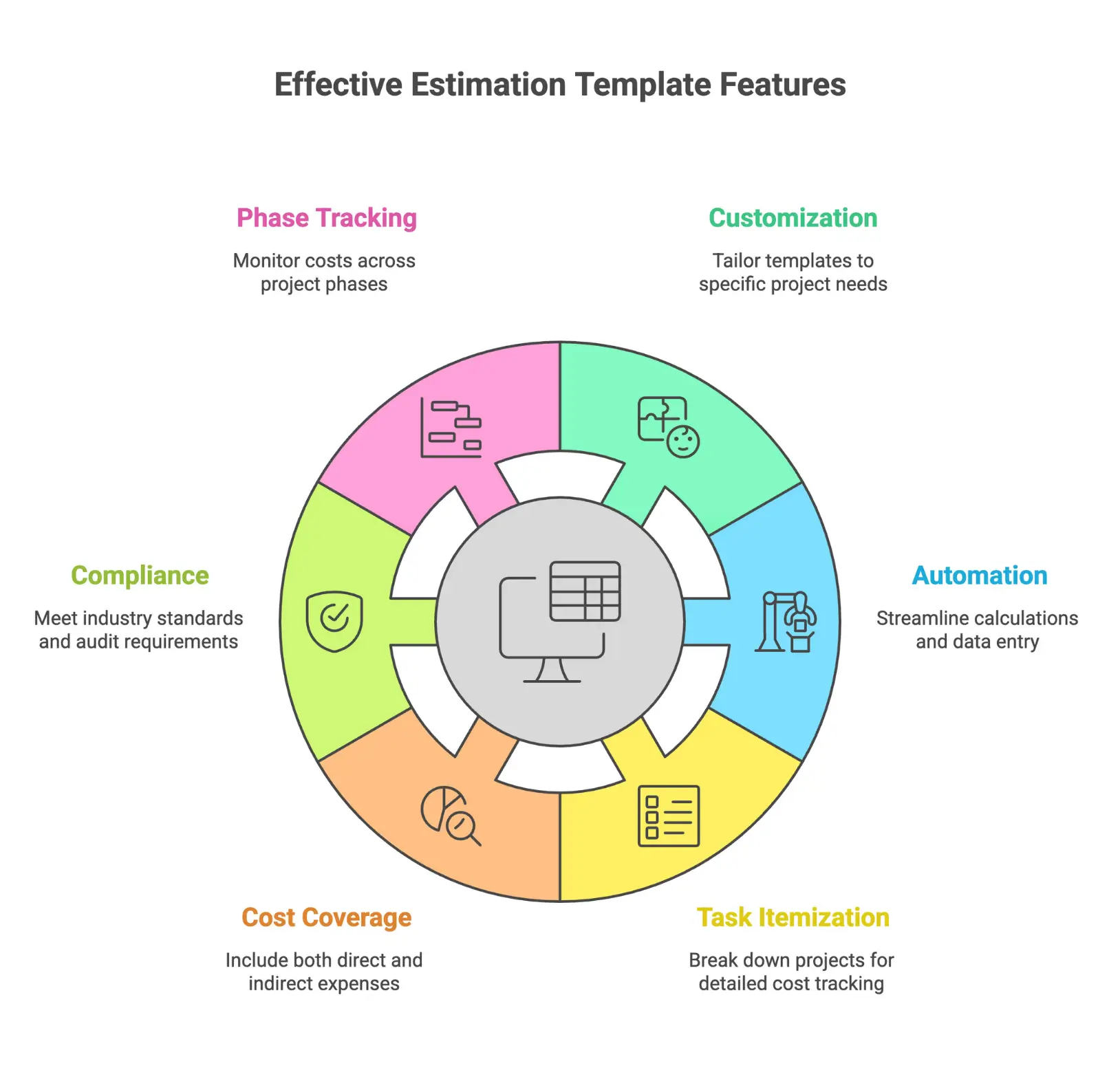
Complete Customization
Every estimate project costs differently. A customizable estimate template lets you add or remove line items, tailor categories, and adjust formulas for your sector, whether you're scoping an IT rollout or a construction project.
Integrated Automation
A modern estimation template automatically calculates subtotals, total cost, tax, and markups. Integration with project management tools means less manual data entry and fewer errors.
Task Itemization and Clarity
Breaking projects into individual tasks prevents missed costs. A good estimation template lets you allocate labor, track material costs, assign hourly rates, and add notes for assumptions or unique requirements.
Direct and Indirect Costs
Comprehensive templates cover both direct costs (materials, labor) and indirect costs (overheads, contingencies). Reliable templates provide a contingency fund, usually 5-10%, for unforeseen expenses.
Compliance and Audit Readiness
Industry-specific templates (for construction, IT, etc.) help project managers meet requirements and facilitate smoother audits by recording estimated costs, sources, and assumptions in an accessible format.
Multiple Project Phases
Advanced templates let you track project estimates and estimated costs by phase, so you can monitor resources, scheduling, and budget over time. This supports more accurate forecasting and better project management.
Industry-Specific Cost Estimation Templates
Construction Project Estimation Templates
A specialized construction project estimation template makes it easy for contractors to:
- Track material costs, labor, permits, and equipment for every phase
- Compare estimated costs to actual costs as the project progresses
- Justify expenses to project owners or regulators
- Standardize bids and simplify communication between general contractors, stakeholders, and clients
Vergo AI Materials Estimate Excel Template is one example that provides detailed takeoffs for building projects. Construction templates support compliance and streamline the bidding process for more bids and faster project approvals.
IT Project Estimation Templates
For IT and software projects, estimation templates help break down tasks by phase (e.g. requirements, development, testing), estimate hours for each task, and allocate costs by resource or labor category. This lets project managers and clients track progress and total costs through a clear project timeline.
Other Industry Templates
Templates exist for all types of projects: manufacturing, marketing, consulting, and public sector procurement. The best template for your project will cover specific job estimates, regulatory needs, and contract terms typical of your industry.
How to Use an Estimate Template: A Step-by-Step Guide
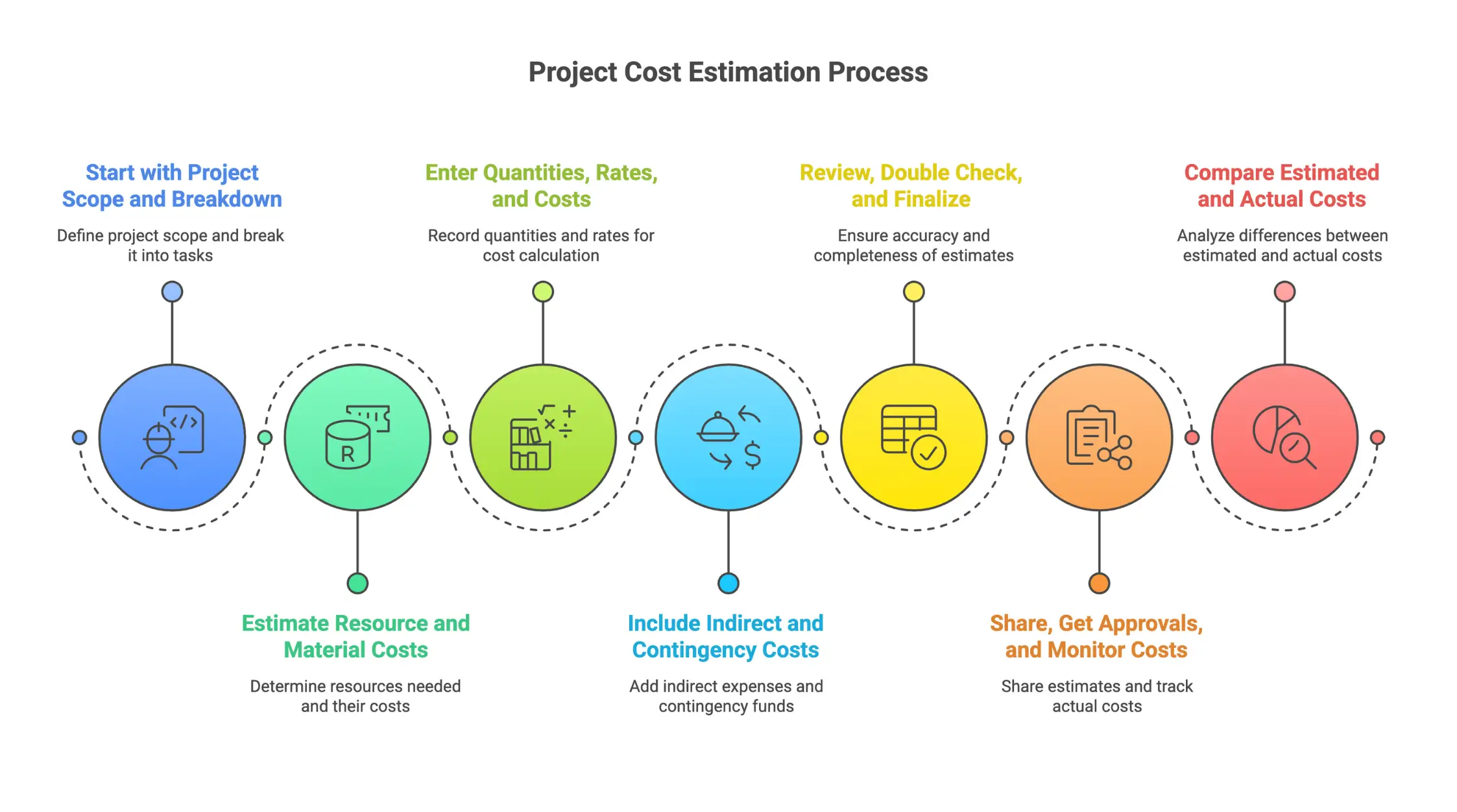
1. Start with Project Scope and Breakdown
Determine your project scope and list all major deliverables. Use your estimation template to break the entire project into individual tasks and phases.
2. Estimate Resource and Material Costs
For each task, estimate the resources needed (people, materials, equipment). Reference historical data for more accurate project estimates.
3. Enter Quantities, Rates, and Costs
Record quantities for each resource or material, input hourly rates, and let the estimation template automatically calculate subtotals and the grand total.
4. Include Indirect and Contingency Costs
Don't forget indirect expenses, such as overheads, management, and contingency funds. Add a buffer (5-10% of the total cost) for surprises.
5. Review, Double Check, and Finalize
Check your numbers, make sure nothing is omitted, and compare to similar projects when possible. Use built-in checks in your estimation template to reduce human error and track all calculations.
6. Share, Get Approvals, and Monitor Costs
Use the estimate template to create a professional summary for stakeholders or clients. Keep the original data for tracking actual project costs as work progresses, and update as required to reflect changes.
7. Compare Estimated and Actual Costs
After project completion, compare the estimated costs in your template to actual costs incurred. Use this data on future projects or to refine your template for better accuracy.
Tip: Many modern templates integrate with project management and accounting systems, reducing administrative work and making it easy to track job estimates, update statuses, and create professional reports.
How to Choose the Right Estimate Template
Match to Project Complexity and Industry
- For new projects, choose a simple estimate template with just the basics.
- For complex construction or IT projects, select a template that allows for detailed itemization, hourly rates, and resource allocation.
- Use industry-specific templates that align with common regulations and compliance needs.
Ease of Use and Training
A good estimation template should be easy to follow. Templates make training and onboarding new team members simpler, as everyone learns the same standardized steps to estimate project costs.
Integration and Automation
The more a template automatically calculates totals and integrates with your project management process, the fewer mistakes your team will make. Digital templates, rather than manual forms, are best for ongoing tracking and real-time collaboration.
Tips for Using Estimation Templates Effectively
- Update templates regularly as prices, resources, and best practices change.
- Build project-specific templates to avoid cramming every job into a generic form.
- Use historical data to validate estimated costs and improve forecasting accuracy.
- Document all assumptions, resources, and notes within the template for future reference.
- Use color codes or visual cues to highlight important aspects of your project cost estimate.
- Standardized estimate templates make reviewing and approving budgets easier for management and clients.
- Use estimation templates as living documents, updating actual costs after each project for continual process improvement.
Example: Construction Project Estimate Template in Action
Imagine a general contractor preparing an estimate for a mid-size commercial construction project:
- Define Project Scope: Breaks the job into phases: demolition, foundation, framing, installation.
- List Individual Tasks: For each phase, lists tasks/timeline, labor hours, resources needed, and material costs.
- Enter Numbers: Records material quantities, updates hourly rates for subcontractors, and uses the template's formulas to track subtotals for each line item.
- Add Contingency: Reserves 8% of the anticipated cost as a buffer.
- Document Everything: Adds notes on unique project requirements, references historical data from similar projects, and merges all components for a grand total.
- Present and Track: Shares estimate with the client, receives signoff, and tracks actual costs as the construction project progresses.
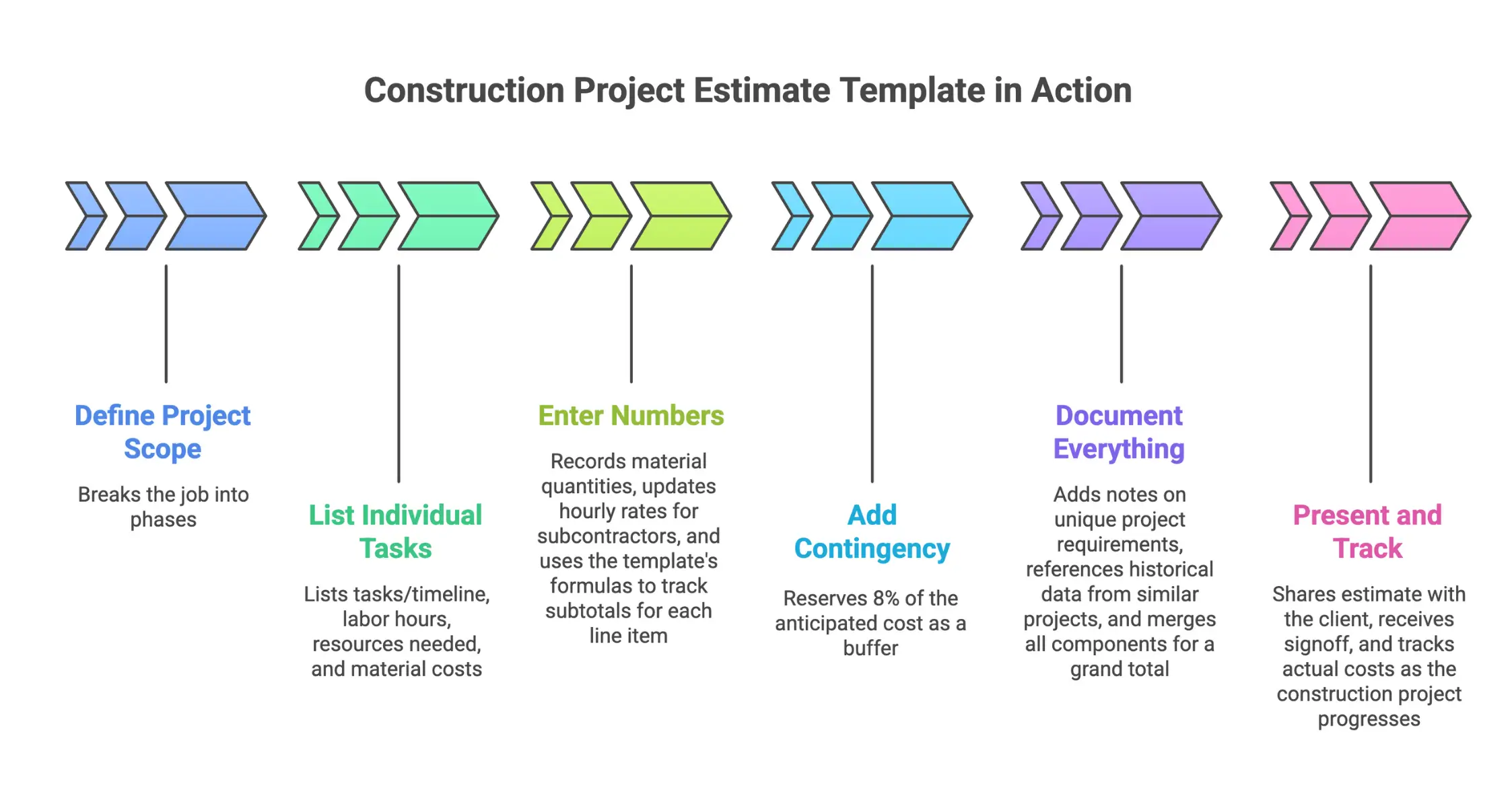
By using the right estimate template, the contractor can avoid missing costs, improve profit margins, ensure every resource is accounted for, and set realistic expectations for all stakeholders.
Frequently Asked Questions About Project Cost Estimating Templates
What is the benefit of using a free estimate template?
A free estimate template saves time and provides an easy, standardized way to estimate project costs for simple or recurring jobs. It’s an accessible starting point for professionals new to estimation templates.
How do I know which estimation template is best for my project?
Match the template to your project’s scope, complexity, and industry standards. Complex projects require templates that allow for detailed breakdowns and tracking, while simpler forms are fine for small jobs.
How can templates improve client relationships?
Using an estimation template lets you present detailed, transparent project cost estimates to clients, strengthening relationships by setting clear expectations and eliminating budget surprises.
What are the most important aspects to include in an estimate template?
Every good estimation template should include line item descriptions, quantities, unit rates, total cost, contingency funds, project timeline, and terms and conditions.
How do estimation templates help prevent cost overruns?
Templates encourage detailed planning, track potential costs at every project phase, and highlight estimated costs versus actual costs in real time, allowing for earlier intervention if the budget gets off track.
Best Practices for Continual Improvement and Project Cost Optimization
- Schedule a template review after every major project or each quarter.
- Compare actual costs against estimated costs to identify recurring issues.
- Gather team feedback and update templates for new project phases or resources.
- Refine formulas and project phases as needed for better accuracy.
- Leverage historical data and feedback from project managers to refine the estimation process and improve future project cost estimates.
Ready to Improve Your Project Cost Estimates?
A well-designed cost estimating template helps you plan better projects, improve accuracy, save time, and avoid costly surprises. Explore Nomitech’s suite of project estimation tools or connect with the team to find the right estimate template for your projects today.




Stay Up to Date
Subscribe to our Newsletter today and receive the latest updates, trends, expert insights, and exclusive offers tailored to your specific industry.