
5D BIM Cost Loading: Integrate Cost Data into Your BIM Model
TL;DR:
Go beyond simple 3D models and take control of your construction projects by cost loading your BIM model. Using 5D BIM with construction BIM software, such as CostOS, lets you tie cost and resource data directly to your digital building elements. This approach leads to more accurate cost estimates, smarter scheduling, and easier, real-time cost tracking throughout the project lifecycle.
Beyond Traditional Quantity Takeoff
Still juggling static takeoffs and scattered spreadsheets for your project costs? There’s a better way. Building Information Modeling (BIM) can do far more than generate visuals. With 5D BIM, cost estimation becomes a core part of the model itself, transforming what was once a simple 3D rendering into a true project management and cost control tool.
Picture a single, detailed building model that drives not only estimation, but also procurement, scheduling, and real-time project progress monitoring. Cost loading your BIM turns it from a basic rendering into a hub for integrated cost management and project controls. The right cost estimating software, such as CostOS, brings your models to life, turning them into a reliable source for detailed cost data and better decision making throughout the project.
Wondering how this actually works, and why it matters on real jobsites? Let’s dig into how 5D BIM cost loading changes everything, making your process faster, smarter, and much more predictable for project managers and project teams.
The 5D BIM Cost Loading Workflow
Intelligent Quantity Extraction and Cost Estimation
Modern 5D BIM tools, including CostOS, can pull precise material quantities, areas, volumes, lengths, and more, directly from your building’s IFC model. By automating quantity takeoff from the intelligent components of the model, 5D BIM eliminates the need for manual data entry and significantly reduces the time required to produce detailed estimates. When these quantities connect to resource assemblies, real productivity rates, and cost databases that reflect real conditions onsite, the accuracy of your cost estimation increases dramatically.
With CostOS Databases, you tap into expert knowledge to sharpen your estimates and cost analysis further, supporting accurate cost estimation and better resource allocation at every stage.
Flexible Element Definition
BIM models represent the physical and functional characteristics of construction projects for coordination, but not always for detailed estimating. Take a concrete slab: the architectural model sees it as one piece, but in reality, cost estimators know you need to break it down: formwork, rebar, concrete, finishing, coatings, each with its own associated costs. The best 5D BIM solutions let you define new elements, split assemblies, and create custom estimating breakdowns that mirror construction sequences. All of this happens without altering the designer’s original digital representation, keeping design coordination intact.
Using parametric estimating within these systems maintains consistency and scalability for cost estimation across all project phases.
Writing Cost Data and Resource Metadata Back to IFC
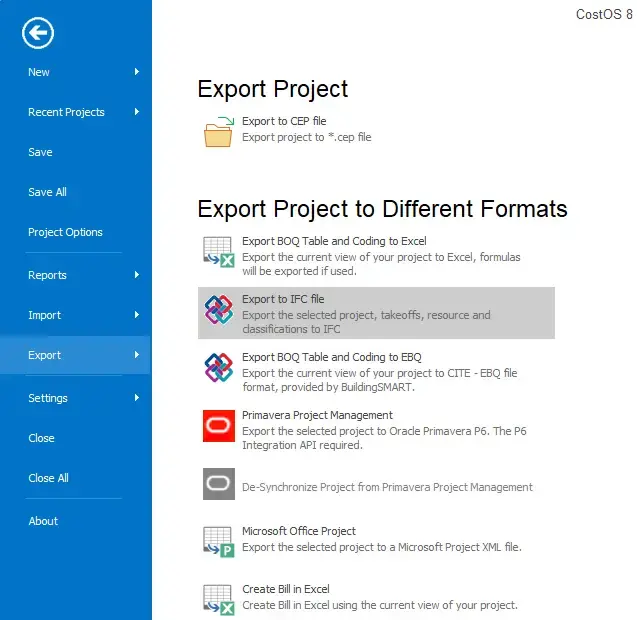
Robust 5D BIM construction software does more than just read and calculate; it writes cost data and resource information back to your BIM model. This means you can enrich an IFC file so that each component includes every detail: material costs, insulation, labor rates for each trade, equipment costs, and even costs tied to specific work packages. While many BIM platforms can handle IFC-based cost estimating, only a select few, like CostOS, allow you to create and export fully cost-loaded IFC models, complete with detailed cost information. This ensures your cost estimating database remains the single source of truth across your project lifecycle.
5D BIM integrates cost data into the model, so project stakeholders can visualize not only what will be built and when, but also how much it will cost at each stage.
Exporting a cost-loaded IFC model from CostOS, including quantities, resources, and cost data
Key Benefits of 5D BIM Cost Loading
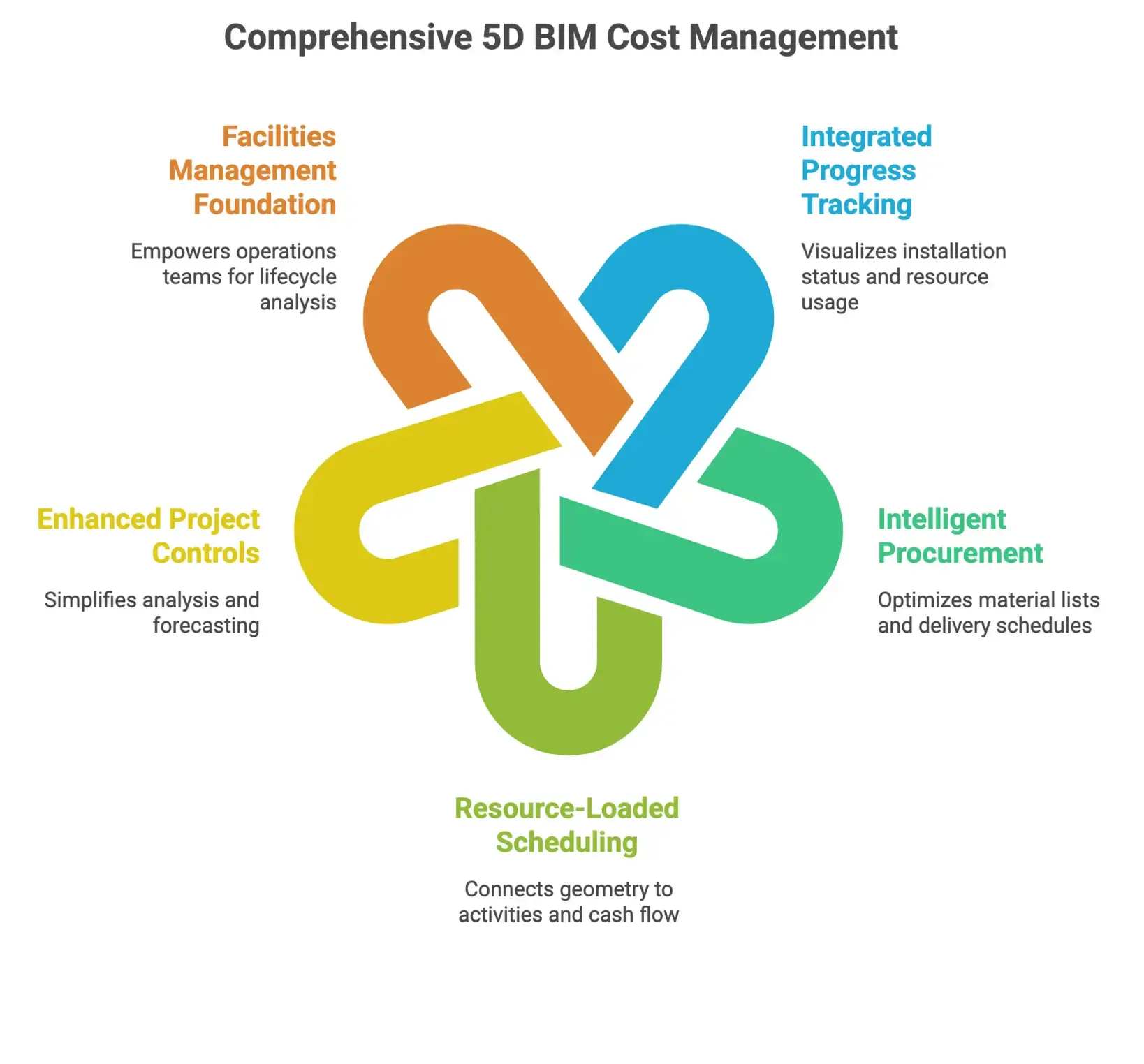
- Integrated Progress and Cost Tracking: Visualize what’s installed, track resource allocation and usage, and generate live progress and cost reports straight from your 3D model.
- Intelligent Procurement: Extract exact material lists by trade, link them to scheduling data for just-in-time delivery, and optimize inventory based on real project needs, all with integrated cost data.
- Resource-Loaded 4D Scheduling: Connect your model’s geometry to construction activities, flowing resources and cost estimates directly into your project schedule to keep cash flow and costs controlled.
- Enhanced Project Controls and Cost Management: Simplify earned value analysis, monitor cost variance, and access real-time budget forecasts. Value engineering is streamlined with scenario analysis. For more, see cost estimating vs cost control.
- Facilities Management Foundation: The cost and resource details embedded during construction empower operations teams for maintenance, replacement planning, and full lifecycle analysis.
5D BIM transforms the change order process into a seamless, automated workflow, allowing instant recalculation of associated material, labor, and equipment expenses as design changes occur. This leads to efficient project management by minimizing disruptions and financial impact.
Cost Estimation and Management with 5D BIM
5D BIM improves cost estimation accuracy by automating the quantity takeoff directly from the model’s intelligent components. As changes are made, real-time updates and adjustments to cost estimates and detailed cost data are possible, maintaining up-to-date information for all project stakeholders.
By integrating cost data into the BIM process, project teams gain early cost visibility, improving budgeting and supporting informed decisions throughout the project lifecycle. Proactive financial management becomes a reality, shifting away from traditional cost estimation methods that only address issues after they arise.
Cash flow forecasting within 5D BIM enables managers to visualize when money will be spent, aiding both financial control and investment planning.
Value engineering in 5D BIM allows teams to test design scenarios and compare material costs, resource allocation, and project timelines to select the most cost-effective approach.
Key Requirements for 5D BIM Success
To maximize the significant advantages of 5D BIM cost loading, your construction BIM software should include:
Essential Features:
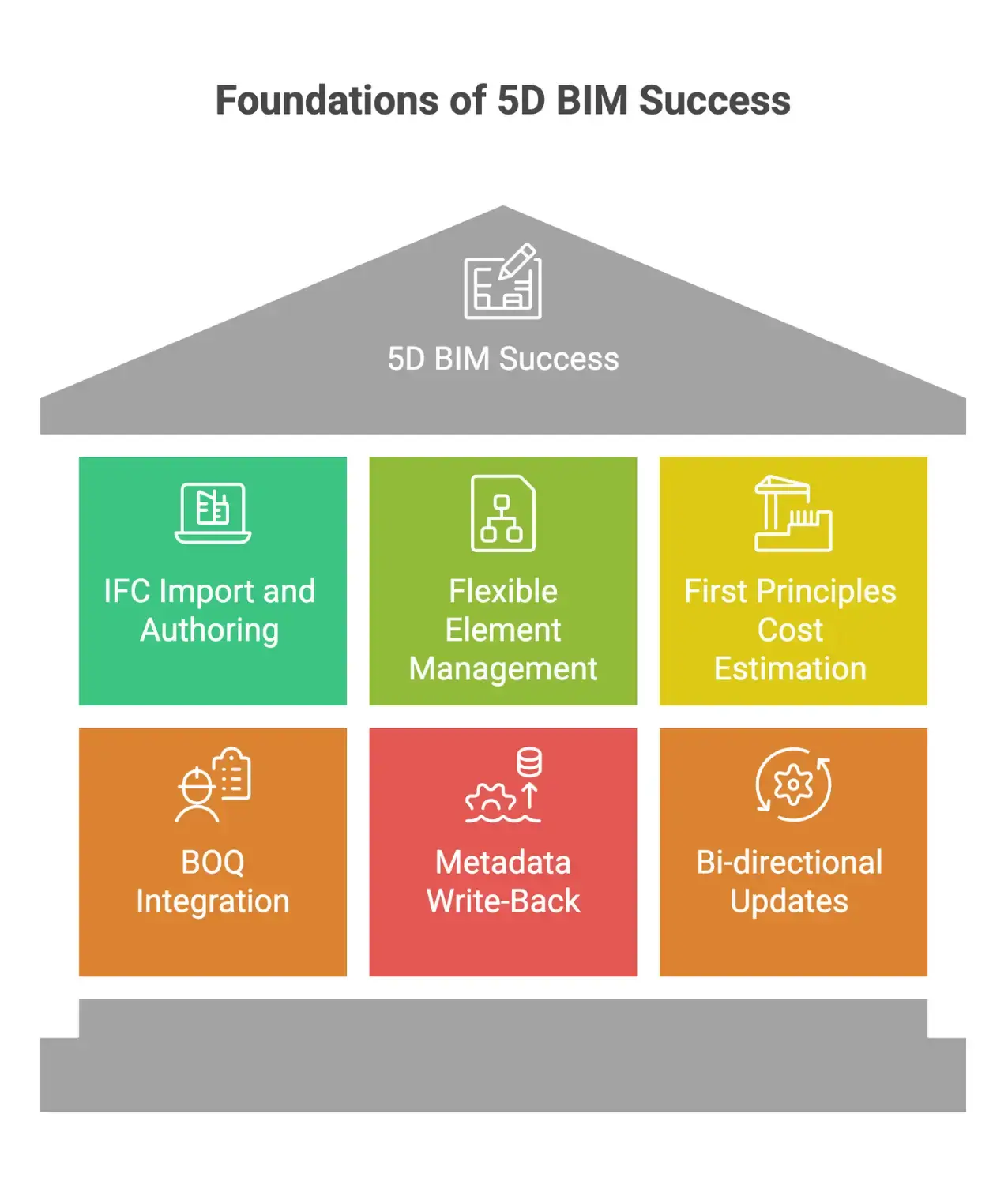
- IFC Import and Authoring: Import standard IFC models from any design tool, then generate new IFC files loaded with your detailed cost data.
- Flexible Element Management: Create and manage custom elements and estimating structures beyond the physical and functional characteristics of the initial model.
- First Principles Cost Estimation: Use actual resource assemblies and crew labor rates to model your construction methods from the ground up.
- BOQ Integration: Link material quantities from 3D elements directly to your project’s bill of quantities and cost breakdown. For more, see Bill of Quantities features.
- Metadata Write-Back: Attach comprehensive cost and resource profiles to every IFC element.
- Bi-directional Updates: Keep cost estimates, 3D geometry, and cost databases synchronized as the project evolves
Implementation Challenges in 5D BIM Cost Loading
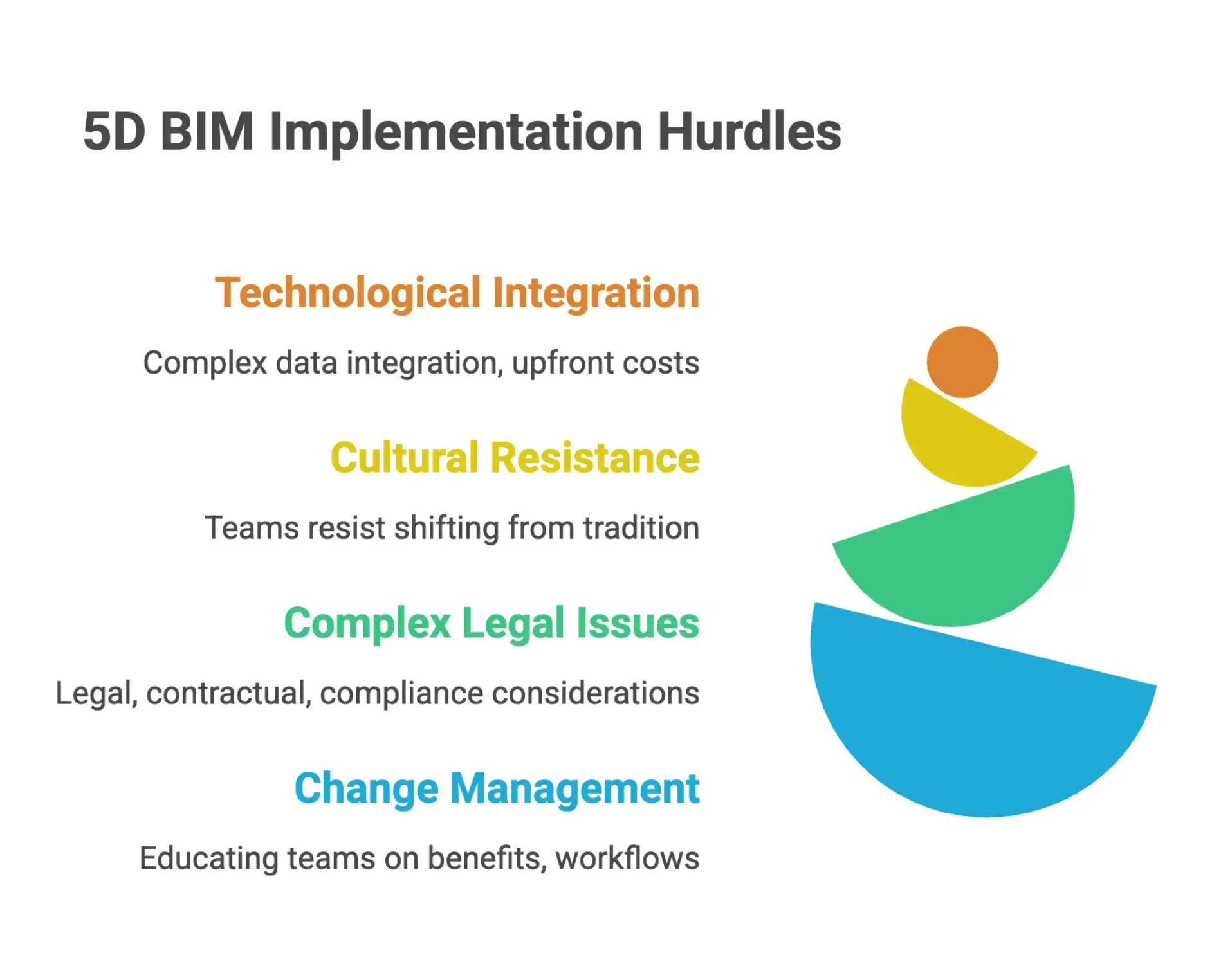
Adopting 5D BIM faces real-world challenges:
- Technological Integration: Integrating cost data into existing workflows can be complex and may require upfront investments in both software and training.
- Cultural Resistance: Project teams can encounter resistance as they shift from traditional methods to a cost-loaded BIM process.
- Complex Legal and Workflow Issues: There may be legal, contractual, and compliance considerations, as well as the need to change established work patterns for project stakeholders.
- Change Management: Educating project managers, cost estimators, and teams on the benefits and workflows of integrating cost data into BIM is crucial for successful adoption.
Collaboration and Stakeholder Management
5D BIM enhances collaboration by providing a single, accurate source of truth, a Common Data Environment that supports transparency and reduces disputes for project stakeholders. With everyone accessing and working from the same integrated BIM model, all decisions are made with complete, up-to-date cost information. This shared data environment empowers project teams and project managers to align on goals, improve communication, and maximize efficiency on complex infrastructure and residential projects.
5D BIM’s Growing Impact on the Construction Industry
The construction industry is rapidly adopting 5D BIM for its transformative impact on project outcomes, project control, and financial management. The global 5D BIM market was valued at USD 2.9 billion in 2023 and is projected to surge to USD 8.99 billion by 2032, growing at a compound annual growth rate of 13.4 percent. As construction projects become more complex, the need for dynamic cost management, resource allocation, and effective decision making throughout the project lifecycle becomes even more essential.
FAQ
What is 5D BIM Cost Loading?
5D BIM cost loading builds on traditional 3D modeling by linking cost and resource data straight into every building component, allowing for real-time cost estimation, cost control, and financial management as your project evolves. It transforms your BIM model into a dynamic decision making tool.
How does 5D BIM improve cost estimation and project outcomes?
5D BIM streamlines cost estimation by automating quantity takeoff and integrating cost data with the BIM process, yielding more accurate cost estimates, smarter procurement, clearer project schedules, and comprehensive reporting. All project teams work from a shared source of truth, making it easier to manage every phase, from planning and construction through to delivery and facilities management.
Can I customize cost assemblies and resource definitions within 5D BIM tools?
Absolutely. Advanced platforms like CostOS let cost estimators and project managers tailor estimating structures, model components, and resource breakdowns to match their project’s actual construction methods, with no need to follow one-size-fits-all approaches.
What are the main challenges in implementing 5D BIM for cost management?
Key challenges include technological integration, upfront investment, resistance to new workflows by project stakeholders, and the added complexity of linking cost data to model components and decision making processes.
Conclusion
Integrating cost and resource data directly into your BIM model turns a static building model into actionable project intelligence. With construction BIM software featuring strong IFC authoring and cost management capabilities, like CostOS, your team can move beyond static visuals to dynamic, cost-driven models that serve as your single source of truth. The result is more accurate cost estimates, efficient financial control, and better decision making for every phase of the project lifecycle.
Ready to upgrade your 5D BIM workflow and streamline your cost estimation? Explore how the AI cost modeling suite from Nomitech can drive your next digital transformation in construction.


Stay Up to Date
Subscribe to our Newsletter today and receive the latest updates, trends, expert insights, and exclusive offers tailored to your specific industry.